Mydeck Management Sdn. Bhd.

We buildsoftwarethat works.

Seven disciplines, one team. The people who design your system are the people who build, secure and host it.

What we do

01

Website design

Design that carries your brand’s message, not just a good-looking page.

02

Website development

Sites built for new ventures, small businesses and portfolios.

03

Software development

Systems that cut manual process out of the day and hold up as you grow.

04

UI / UX design

Flows and screens that people come back to.

05

Cybersecurity

Audits, hardening and monitoring that keep your systems and data safe.

06

Hosting services

Reliable, managed hosting so your site and systems stay up.

07

IT consultancy

Strategic guidance to plan, prioritise and de-risk your technology roadmap.

Not sure which you need?

Tell us the problem →

About us

Our
journey.

MyDeck started from our late founder’s vision of changing education through technology, in the context of Industry 4.0. After the pandemic, under new leadership, the scope widened past education.

Read our story →

Latest project

Employer Training provider Trainee Crew

Anchorworx

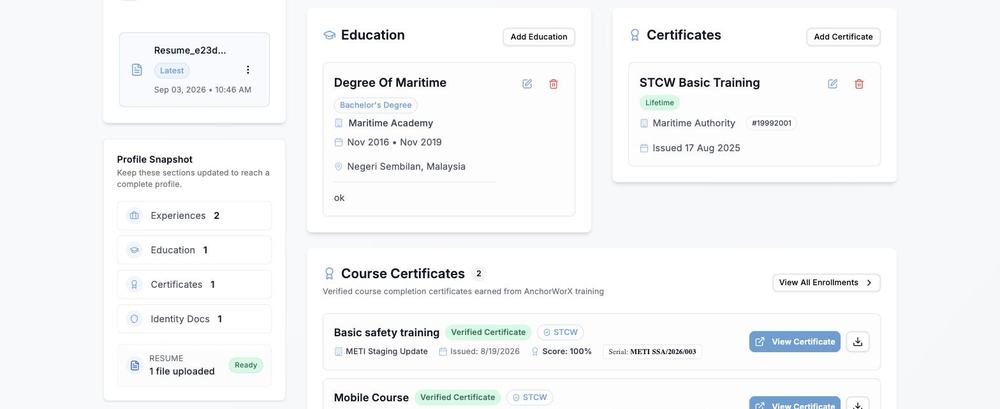
A job portal built around four sides of the same market. Profiles, certificates, applications and shortlisting run through one system.

  1. 01

    Smart job matching

    Matched on skills, certifications and experience across maritime sectors.

  2. 02

    Verified credentials

    STCW, OPITO and other industry required certifications, checked.

  3. 03

    Talent screening

    Role specific checks for offshore and port operations roles.

  4. 04

    Complete profiles

    Experience, certifications, safety training and equipment proficiency.

Visit anchorworx.com ↗
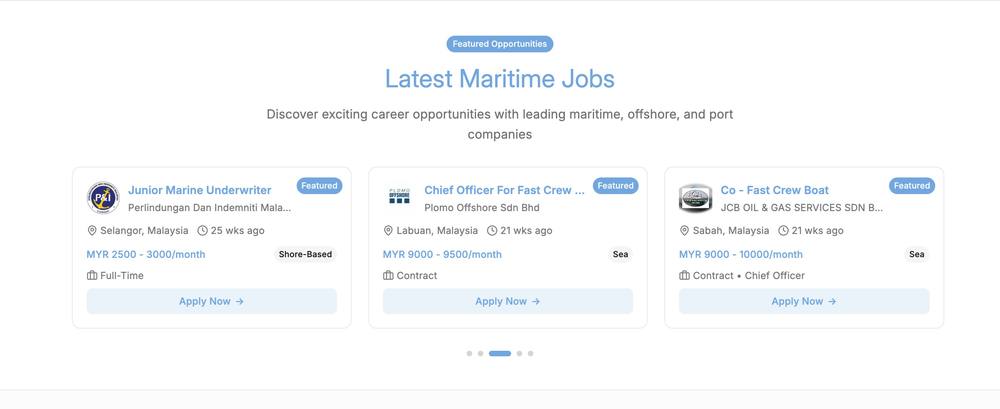
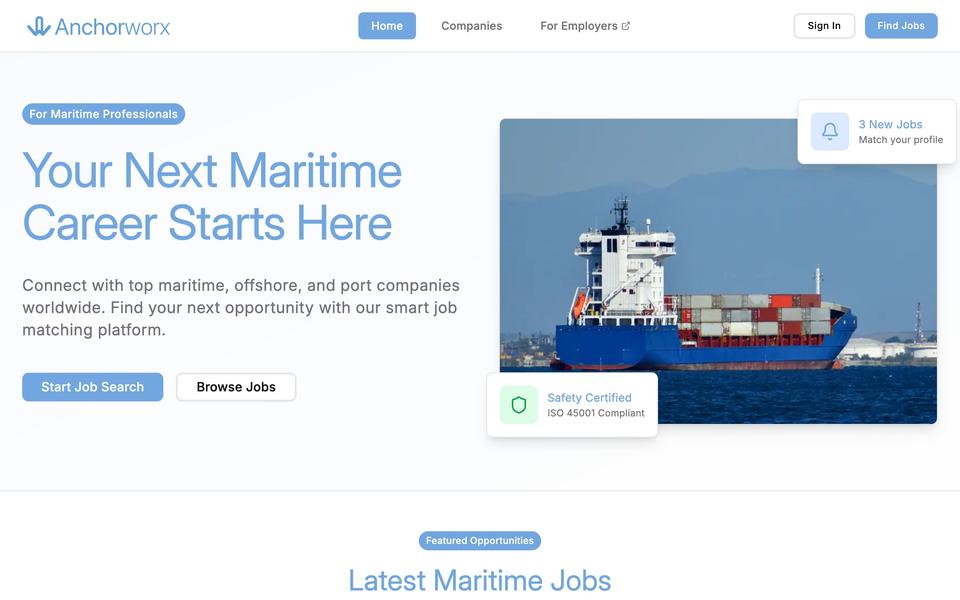
For crew Anchorworx job listings, each role showing salary, location and contract type
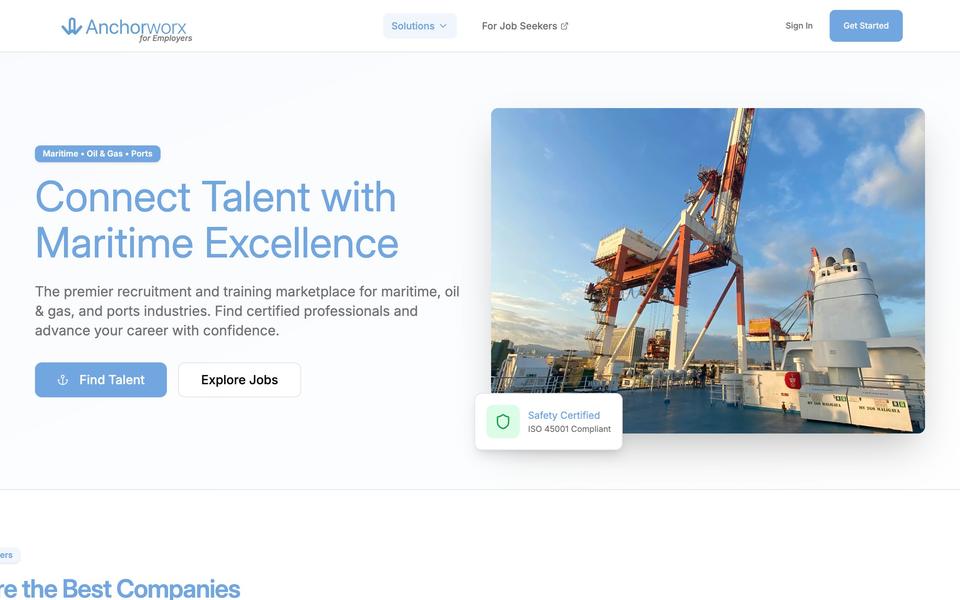
For employers The Anchorworx employer features: job matching, verified credentials, screening and profiles

Portfolio

From education to new niche

2026

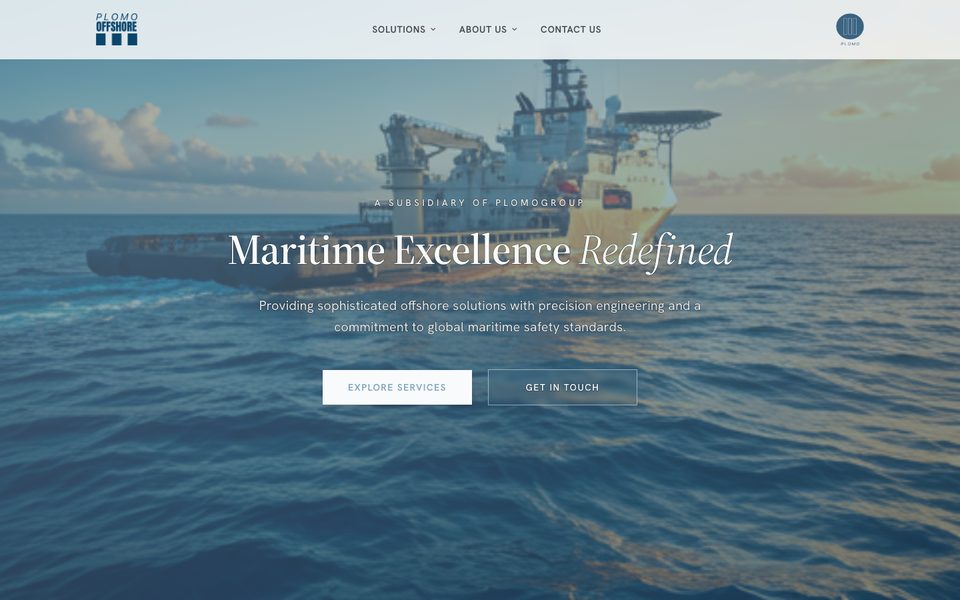
Plomo Offshore

Website design and development.

2025

Anchorworx

Job portal for employers, training providers, trainees and crew.

2022

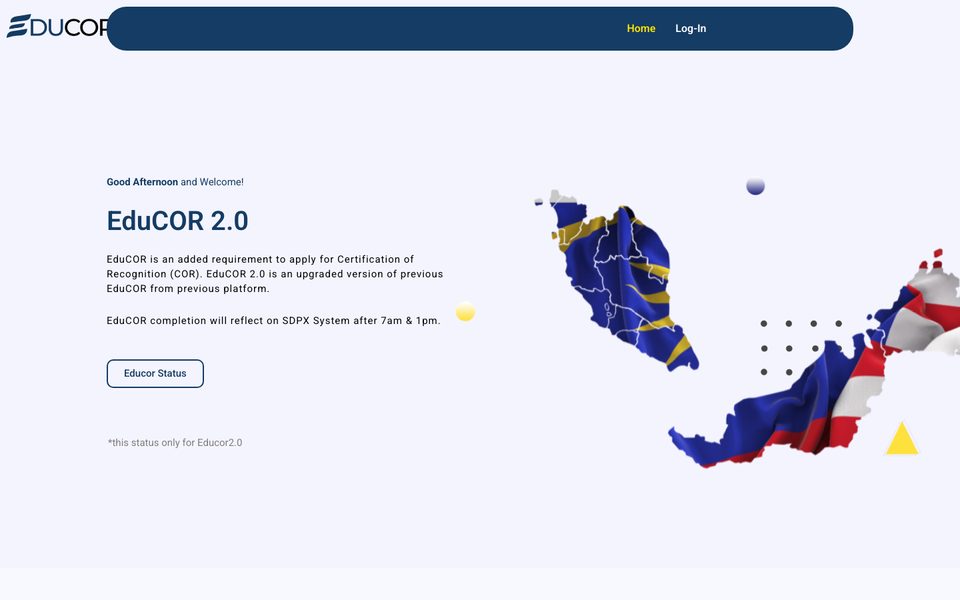
EduCOR V2

New interface and system.

2019

VR and AR projects

LOL, AR Signboard, Red Fox AR System, Recycle Garbage Game.

Featured clients

KA-Petra
AWH Group
LS Cable & System
Petrosains
Seaport Worldwide
JohorPort
MDEC
ArangMas
JPJ
Plomogroup
Plomo Offshore
Don Maritime

Have a project or
idea in mind?

We reply on WhatsApp, usually the same working day.

Get in touch

Unit 10-2 (Level M), UOA Business Park,
No. 1, Jalan Pengaturcara U1/51A,
Seksyen U1,
40150 Shah Alam, Selangor

info@mydeckmgmt.com
03-51916232
WhatsApp 013-443 4504

About Us · Portfolio · Blog · Contact Us

About us

Ourjourney.

MyDeck started from our late founder’s vision of changing education through technology, in the context of Industry 4.0.

How we got here

2018 to 2019

Getting learning off paper

Computer based training on workplace safety, then VR and AR built for the classroom. Every early project came back to the same idea, that a lesson should not depend on a printed page.

2020 to 2022

New leadership, wider scope

The pandemic ended the classroom as the only place learning happened. Under new leadership the work grew past education, and EduCOR was rebuilt in 2022 with a new interface and system.

Now

Systems organisations run on

Anchorworx in 2025 put four sides of the maritime market on one system. The work now aims at the Sustainable Development Goals.

Focus areas

The Sustainable Development Goals we build against.

Healthcare Education Inequality Economic growth Climate
How we build
AI in the loop

Design, code and review

We build with AI across design, code and review, so a small team ships at a pace that used to need a large one.

Weeks, not months

Working software early

You get something running to react to, instead of a specification you have to imagine.

Built to change

Shaped to be edited

Requirements move. Systems are put together so the tenth change costs no more than the first.

After launch

We stay on it

Hosting, monitoring and the changes that come later. Not a handover and goodbye.

The company

Registered

Mydeck Management Sdn. Bhd.
SSM No. 1036210-K

Status

Malaysia Digital status company

Where

Unit 10-2 (Level M), UOA Business Park,
No. 1, Jalan Pengaturcara U1/51A,
Seksyen U1, 40150 Shah Alam, Selangor

Work with us

Have a project or idea in mind?

Let’s build
What we do

Services &our capabilities.

Seven disciplines, one team. From the first sketch to a system that holds up as you grow.

What we build

01

Website design

Design that carries your brand’s message, not just a good-looking page.

IncludesDiscovery, sitemap, wireframes, visual design, responsive layouts, design handover.

Website design
02

Website development

Sites built for new ventures, small businesses and portfolios.

IncludesBuild from design, content management, forms and integrations, performance and search basics, launch.

Website development
03

Software development

Systems that cut manual process out of the day and hold up as you grow.

IncludesRequirements, data model, application build, user roles and permissions, testing, deployment.

Software development
04

UI / UX design

Flows and screens that people come back to.

IncludesUser flows, information architecture, interface design, prototypes, a reusable design system.

UI / UX design
05

Cybersecurity

Audits, hardening and monitoring that keep your systems and data safe.

IncludesVulnerability assessment, hardening, access review, patching, monitoring and incident response.

Cybersecurity
06

Hosting services

Reliable, managed hosting so your site and systems stay up.

IncludesProvisioning, domains and DNS, TLS certificates, backups, uptime monitoring.

Hosting services
07

IT consultancy

Strategic guidance to plan, prioritise and de-risk your technology roadmap.

IncludesCurrent state review, technology roadmap, tooling and vendor advice, risk assessment.

IT consultancy

Working with us

Registered

SSM 1036210-K

Mydeck Management Sdn. Bhd., a company incorporated in Malaysia.

Status

Malaysia Digital

Recognised under the Malaysia Digital status programme.

Track record

Building since 2018

From classroom systems to the platforms organisations run on today.

Where

Shah Alam, Selangor

UOA Business Park, working with clients across Malaysia.

Trusted by

Work with us

Have a project or idea in mind?

Let’s build
Portfolio

From educationto a new niche.

The products and systems we have shipped, from our education roots to the niches we build for now.

Selected work

Anchorworx

Anchorworx

A job portal for employers, training providers, trainees and crew. All four sides on one system.

Anchorworx Company

Anchorworx Company

The employer side. Post vacancies, manage company profiles and shortlist candidates.

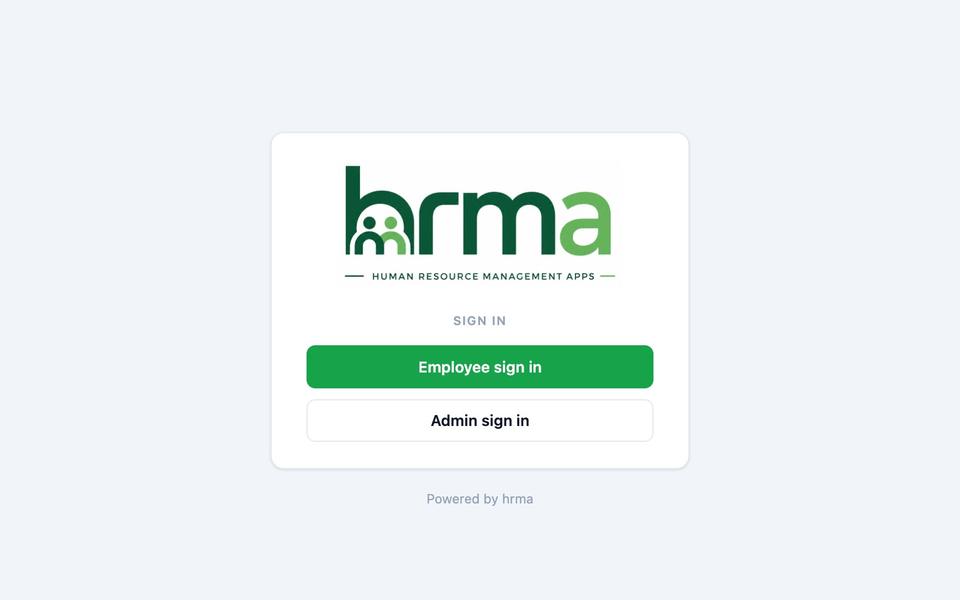
Human Resource Management System

Human Resource Management System

A centralised HR system for Plomogroup. Attendance, leave and claims in one place.

EduCOR

EduCOR

Our education platform. Classroom processes moved onto paperless systems.

Plomogroup

Plomogroup

Website redesign and development for Plomogroup, with a clearer online presence.

Plomo Offshore

Plomo Offshore

Website redesign and development for Plomo Offshore, with its services presented more clearly.

More projects

2025

Professional Email, Hosting and Consultancy

Email, hosting and IT consultancy for NS Maritime to support its digital infrastructure.

2025

Website Design and Development for Arang Mas

Redesign and development for Arang Mas, with a modern interface and improved experience.

2019

VR and AR projects

VR and AR projects built for the education system.

2018

Computer Based Training (CBT)

Computer-based training on safety awareness for the workplace.

Work with us

Have a project or idea in mind?

Let’s build
Knowledge hub

Notes fromthe workshop.

Writing from the MyDeck team on the projects we ship, the tools we build with and what we pick up along the way.

Latest posts

Behind the Build

Behind the Build: The Stack We Ship With

React, Next.js, Node and MongoDB. The small stack every project we ship is built on, and why each piece earned its place.

September 2, 2026 · MyDeck

Read the full article

We build across websites, software and systems, but the pieces underneath stay the same. Here’s the small, dependable stack we ship with, and why each part earned its place.

React for the interface

We build interfaces in React. Components are reusable, so the tenth page costs a fraction of the first. The design system stays coherent and later screens snap together from parts we already trust.

Next.js as the framework

Next.js layers server-side rendering and routing on top of React, so pages load fast and stay readable to search engines, and the same team can own the whole path from browser to API.

Node.js on the server

One language front to back keeps context-switching low. The logic, the API and the tooling all read the same way, which makes a small team move faster.

MongoDB for the data

The document model bends when the requirements do. Adding a field or a new shape lands without a full migration, so the system keeps up as the product grows.

Why this stack

Four pieces, one language, minimal ceremony. It is fast to prototype, cheap to maintain and easy to hand over, which is exactly what our clients need after launch.

Software Development

The Roadmap to Success: General Software Development Steps

Software development takes careful planning, coordination and execution, whether you are a seasoned developer or just starting out. We walk you through the general steps, from idea to finished product.

October 12, 2023 · MyDeck

Read the full article

Software development is an intricate process that requires careful planning, coordination, and execution. Whether you’re a seasoned developer or a newbie just stepping into the world of code, understanding the fundamental steps of software development is essential. In this article, we’ll take you on a journey through the general software development steps, from idea conception to a finished product.

1. Idea Generation and Requirement Analysis

Every great software project starts with an idea. The first step involves brainstorming and identifying the problem you want to solve or the need you want to fulfill. Once the idea takes shape, you move on to requirement analysis. This phase involves defining what the software should do, who the users are, and what features and functionalities are needed.

2. Planning and Design

With a clear understanding of the project’s requirements, it’s time to plan your development process. This includes setting milestones, creating a timeline, allocating resources, and defining the project scope. In the design phase, you’ll create wireframes, mock-ups, and architectural diagrams to visualize how the software will function and appear.

3. Implementation (Coding)

Now comes the core of software development, the coding itself. Developers write code based on the design and requirements. They follow programming languages, frameworks, and best practices to build the software’s functionality. This is an iterative process where code is continually tested and refined.

4. Testing

Quality assurance is a crucial step. Developers run various tests, including unit testing, integration testing, and system testing, to ensure the software meets the requirements and functions as intended. Bugs and issues are identified and fixed during this phase.

5. Deployment

Once your software passes rigorous testing, it’s ready for deployment. You can choose to deploy it on a local server, cloud, or a production server depending on the project’s scale and requirements. Deployment also involves configuring the software for real-world use.

6. Maintenance and Updates

Software development doesn’t end with deployment. Maintenance is an ongoing process to keep the software updated, secure, and functional. Regular updates, patches, and fixes are essential to address issues that may arise after the software is live.

7. User Feedback and Iteration

User feedback is invaluable. After the software is deployed and in the hands of users, their experiences and suggestions can guide improvements. Developers use this feedback to make necessary changes and enhance the software further.

8. Documentation

Comprehensive documentation is vital for your software’s longevity. It should include user guides, developer documentation, and any relevant technical documents. Proper documentation makes it easier for users and future developers to understand and work with the software.

9. Version Control and Source Code Management

Throughout the development process, it’s crucial to maintain version control. Using tools like Git and platforms like GitHub or Bitbucket ensures that you have a complete history of changes and allows for collaboration with other developers.

10. Project Review and Post-Development Analysis

Once the software has been in use for a while, it’s essential to conduct a project review. This helps in identifying what went well and what could have been done better. Post-development analysis is an opportunity to reflect on the project’s success and learn valuable lessons for future endeavors.

Software development is a journey that involves various phases, each with its unique challenges and requirements. Understanding and following these general software development steps is essential for producing reliable, efficient, and user-friendly software. With a solid plan, diligent coding, and a commitment to quality, your software development project is set for success. Keep in mind that software development is a continuous process, and the cycle of improvement never truly ends.

Prototyping

Prototype Tools for IT Development: Bridging the Gap from Idea to Reality

Prototypes bridge the gap between concepts and tangible solutions, helping developers, designers and stakeholders visualise, test and refine their ideas before investing significant time and resources.

September 27, 2023 · MyDeck

Read the full article

In the fast-paced world of IT development, the ability to quickly prototype and validate ideas is paramount. Prototypes serve as the bridge between concepts and tangible solutions, helping developers, designers, and stakeholders visualize, test, and refine their ideas before investing significant time and resources. In this article, we’ll explore some of the most effective and popular prototype tools for IT development.

Figma: The Collaborative Design Powerhouse

Suitable for: Web and mobile app design and prototyping.

Figma has gained immense popularity in recent years due to its cloud-based, collaborative nature. It allows multiple team members to work on a project simultaneously, making it ideal for distributed teams. Figma’s design and prototyping capabilities, coupled with its real-time collaboration features, make it a go-to choice for creating interactive prototypes.

Sketch: A Mac-Centric Design Tool

Suitable for: Mac-based designers and web/mobile app prototyping.Sketch is a vector-based design tool designed exclusively for macOS. While it’s not a prototyping tool per se, it seamlessly integrates with prototyping tools like InVision and Framer, allowing designers to create interactive prototypes right within the Sketch environment.

Adobe XD: A Versatile Design and Prototyping Tool

Suitable For: Web and mobile app design and prototyping.Adobe XD is part of the Adobe Creative Cloud suite and is tailored for UX/UI designers. It offers design, prototyping, and collaboration features in one package. XD is known for its ease of use and compatibility with other Adobe tools like Photoshop and Illustrator.

InVision: A Prototyping Powerhouse

Suitable For: Web and mobile app prototyping, user testing, and collaboration.InVision is a dedicated prototyping platform that focuses on creating interactive, high-fidelity prototypes. It offers features like user testing and collaboration, making it a preferred choice for teams looking to iterate on designs and gather user feedback.

Axure RP: For Complex Prototypes

Suitable For: Web and desktop application prototyping.Axure RP is a comprehensive prototyping tool that specializes in creating highly interactive and complex prototypes. It’s often favored by UX designers working on intricate user flows and interactions.

Balsamiq: Wireframing Simplified

Suitable For: Low-fidelity wireframing and web/mobile app prototyping.Balsamiq is a rapid wireframing tool that helps designers and developers create simple, sketch-like prototypes quickly. It’s particularly useful in the early stages of project ideation when the focus is on layout and content placement.

Proto.io: Web-Based Prototyping

Suitable For: Web and mobile app prototyping.Proto.io is a web-based platform that enables designers to create interactive prototypes with a drag-and-drop interface. It’s known for its ease of use and robust collaboration features.

Marvel: Simplicity in Prototyping

Suitable For: Web and mobile app prototyping.Marvel offers a straightforward approach to creating prototypes. It integrates well with design tools like Sketch and Figma, allowing designers to turn their static designs into interactive prototypes effortlessly.

Justinmind: Enterprise-Grade Prototyping

Suitable For: Web and mobile app prototyping, enterprise-level projects.Justinmind is a versatile prototyping tool suitable for both small-scale projects and enterprise-level applications. It supports complex interactions, responsive design, and user testing.

The choice of a prototype tool for IT development depends on your specific needs, team collaboration requirements, and project complexity. Some teams may opt for a combination of design and prototyping tools to leverage the strengths of each. Ultimately, the goal of using these tools is to accelerate the development process, gather valuable user feedback, and refine your ideas to deliver high-quality IT solutions. Experiment with different tools to find the one that best fits your workflow and project goals.

Development Tooling

Choosing the Best Operating System for Developers

Your choice of operating system can profoundly influence your workflow, productivity and coding experience. While there’s no one-size-fits-all answer, this guide helps you make an informed decision.

September 15, 2023 · MyDeck

Read the full article

In the world of software development, your choice of operating system (OS) can profoundly influence your workflow, productivity, and overall coding experience. While there’s no one-size-fits-all answer to the question of the “best” OS for developers, this guide aims to help you make an informed decision based on your specific needs and preferences.

1. Linux: The Developer's Paradise

Linux is often considered the holy grail of operating systems for developers, and for good reason:

  • Open Source: Linux is an open-source OS, meaning you have access to its source code and can customize it to suit your needs. This flexibility is a dream for developers who want complete control over their environment.
  • Variety of Distributions: Linux comes in various distributions (distros), each tailored to different use cases. Popular ones like Ubuntu, Fedora, and CentOS cater to different developer needs, from web development to server management.
  • Command Line Heaven: Linux’s command-line interface (CLI) is exceptionally powerful. Developers can navigate, manage files, and install packages with ease, making it a favorite among programmers.
  • Development Tools: Linux boasts a vast array of development tools, compilers, libraries, and package managers. It’s the natural habitat for many programming languages and frameworks.

2. macOS: The Ideal Balance

Apple’s macOS is known for its seamless integration with hardware and software. It’s a top choice for developers in specific domains:

  • Unix-Based: Like Linux, macOS is Unix-based, offering a robust command-line environment. This makes it attractive for web development, scripting, and other Unix-related tasks.
  • Xcode: For iOS, macOS, watchOS, and tvOS developers, Xcode is the go-to integrated development environment (IDE). It offers excellent tools for building apps within Apple’s ecosystem.
  • Brew: Homebrew, a package manager for macOS, makes it easy to install and manage developer tools, libraries, and software packages.
  • Cross-Platform Development: macOS also allows developers to work on cross-platform applications for Windows and Linux.

3. Windows: A Multifaceted Choice

Windows, the most popular desktop OS worldwide, is a versatile option for developers:

  • Visual Studio: Microsoft’s Visual Studio is a powerful IDE for Windows that supports a wide range of programming languages, including C++, C#, and .NET.
  • Windows Subsystem for Linux (WSL): WSL allows developers to run a Linux distribution alongside Windows, providing access to Linux tools and a terminal.
  • .NET and ASP.NET: Windows is a natural choice for developers working with .NET and ASP.NET technologies.
  • Gaming and VR Development: For game developers and those in the VR/AR industry, Windows provides excellent support and tools.

4. BSD and Other Niche OSes:

For developers seeking unique experiences, BSD variants like FreeBSD and OpenBSD offer robust, Unix-like environments. These are often used in server and networking applications.

5. Cloud-Based Development Environments:

In recent years, cloud-based development environments like AWS Cloud9, Gitpod, and CodeAnywhere have gained popularity. These platforms allow developers to code from anywhere with an internet connection and offer pre-configured development environments tailored to specific languages and frameworks.

The best operating system for developers ultimately depends on your specific needs, preferences, and the type of development you specialize in. Linux offers unparalleled flexibility and control, macOS provides a seamless ecosystem for Apple developers, Windows excels in the .NET world, and niche OSes cater to specific use cases.

Ultimately, it’s essential to consider your workflow, preferred development stack, and hardware when making your choice. Many developers find themselves proficient on multiple platforms to cater to various projects and client requirements. The key is to adapt your environment to the task at hand, ensuring you have the right tools and resources for efficient and productive development.

Development Tools

Popular IDEs for Any Development

A quick tour of the IDEs developers actually reach for, from VS Code to the JetBrains family, and what each one is best suited to.

September 12, 2023 · MyDeck

Read the full article

The world of software development is a dynamic and diverse landscape, with developers crafting everything from web applications and mobile apps to desktop software and complex systems. One of the key tools that every developer relies on is the Integrated Development Environment (IDE). An IDE can significantly impact productivity, code quality, and overall development experience. In this article, we’ll explore some of the most popular IDEs that cater to a wide range of development needs.

1. Visual Studio Code (VS Code):

Suitable For: Web development, JavaScript, Python, TypeScript, C#, and more.

Visual Studio Code, often referred to as VS Code, is a lightweight, open-source code editor developed by Microsoft. It’s celebrated for its extensibility through a vast library of extensions and its support for a multitude of programming languages. VS Code provides an intuitive interface, robust debugging capabilities, and a version control system integrated with Git.

2. JetBrains IntelliJ IDEA:

Suitable For: Java, Kotlin, Android app development, and more.

IntelliJ IDEA is an intelligent, feature-rich IDE developed by JetBrains. It excels in Java development and has become the gold standard for Kotlin, the official language for Android app development. Its intelligent code assistance, strong refactoring tools, and a variety of plugins make it a favorite among developers.

3. PyCharm:

Suitable For: Python development.

PyCharm is another exceptional IDE from JetBrains, tailored specifically for Python development. It offers an array of features such as code completion, debugging, and testing capabilities. PyCharm also supports web development frameworks like Django and Flask, making it a comprehensive choice for Python web developers.

4. Xcode:

Suitable For: iOS and macOS app development.

If you’re diving into the world of Apple development, Xcode is the IDE of choice. It provides a comprehensive set of tools for building iOS, macOS, watchOS, and tvOS apps. Its interface builder simplifies the design process, and the Swift Playgrounds offer an interactive environment for Swift development.

5. Android Studio:

Suitable For: Android app development.

Android Studio, built on top of IntelliJ IDEA, is the official IDE for Android app development. It streamlines the process of creating Android apps with features like a visual layout editor, a rich code editor, and powerful testing tools.

6. Visual Studio:

Suitable For: Windows app development, C#, .NET development, and more.

Visual Studio, Microsoft’s flagship IDE, is a powerhouse for Windows application development. It offers a wide range of project templates, debugging tools, and support for multiple programming languages, making it a versatile choice for developers working on Microsoft platforms.

7. Unity (Unity Hub):

Suitable For: Game development (Unity Engine).

Unity is a popular game engine for 2D, 3D, VR, and AR development. While not a traditional IDE, it includes the Unity Editor, which provides a robust environment for creating games. Unity Hub helps manage different Unity versions and projects efficiently.

8. Eclipse:

Suitable For: Java development, C/C++, and more.

Eclipse is a longstanding open-source IDE with a vast user community. It’s particularly well-regarded for Java development and offers support for multiple other languages through plugins. Eclipse’s extensibility is one of its standout features.

The choice of an IDE is a personal one, driven by the programming languages and platforms you work with and your individual preferences. The IDEs listed here are some of the most popular and versatile options available, catering to a wide range of development needs. Whichever IDE you choose, it’s essential to become proficient with it to maximize your productivity and enjoy a smoother coding experience in your chosen domain. Ultimately, it’s not just about the tools you use but how effectively you leverage them to bring your coding visions to life.
Languages & Frameworks

Popular Languages and Frameworks for Every Development

We run through the languages and frameworks that keep showing up across web, mobile, desktop and game development, and where each one fits.

September 8, 2023 · MyDeck

Read the full article

In today’s technology-driven world, software development has evolved into a multifaceted discipline. Whether you’re building a website, crafting a mobile app, creating a desktop application, or developing an engaging game, the choice of programming languages and frameworks can significantly impact your project’s success. In this article, we’ll explore some of the most popular languages and frameworks for each of these development domains.

Web Development

Language:

  • JavaScript: JavaScript is the undisputed king of web development. It powers interactivity and dynamic content on nearly every website. Popular frameworks like React, Angular, and Vue.js make it even more potent.

Frameworks:

  • React: Developed and maintained by Facebook, React is a JavaScript library for building user interfaces. It’s renowned for its component-based architecture and virtual DOM, which enhance performance and maintainability.
  • Angular: Google’s Angular is a comprehensive framework for building robust web applications. It offers powerful features like two-way data binding and dependency injection.
  • Vue.js: Vue.js is a progressive JavaScript framework that’s gaining popularity rapidly due to its simplicity and flexibility. It’s known for its ease of integration into existing projects.

Mobile App Development

Language:

  • Swift (iOS): Swift is the go-to language for iOS app development. It’s highly expressive, safe, and efficient.
  • Kotlin (Android): Kotlin is officially supported by Google for Android app development. It’s concise and interoperable with Java, making it a favorite among developers.

Frameworks:

  • React Native: Developed by Facebook, React Native allows you to build mobile apps for iOS and Android using a single codebase. It’s known for its speed and cost-effectiveness.
  • Flutter: Google’s Flutter is a UI toolkit for building natively compiled applications for mobile, web, and desktop from a single codebase. Its widget-based architecture enables highly customizable and responsive apps.

Desktop Application Development

Language:

  • C#: If you’re targeting the Windows platform, C# is a strong choice. It’s the primary language for developing desktop apps using the .NET framework.
  • Java: Java is platform-independent and well-suited for cross-platform desktop development.

Frameworks:

  • Electron: Electron allows you to build cross-platform desktop applications using web technologies (HTML, CSS, JavaScript). It’s behind apps like Slack and Visual Studio Code.
  • Qt: Qt is a C++ framework for creating native applications with a single codebase that can run on multiple platforms. It’s ideal for resource-intensive applications.

Game Development

Language:

  • C++: C++ remains a staple in the gaming industry, thanks to its performance and low-level capabilities.
  • C#: Unity, one of the most popular game engines, uses C# for scripting.

Frameworks:

  • Unity: Unity is a versatile game engine that supports 2D, 3D, and VR/AR development. It’s renowned for its user-friendly interface and asset store.
  • Unreal Engine: Unreal Engine, powered by C++, is known for its stunning graphics and robust physics simulation.

Choosing the right language and framework for your development project is crucial. It should align with your project’s requirements, your team’s expertise, and your target platforms. These popular choices should serve as a good starting point, but remember that the technology landscape is constantly evolving, so staying up-to-date is essential for successful development in any domain.

Knowledge Hub

Welcome to Our Knowledge Hub

Welcome to the Knowledge Hub. What this space is for, what we aim to share, and what you will find here.

September 7, 2023 · MyDeck

Read the full article

Hello, tech enthusiasts and knowledge seekers!

We’re thrilled to welcome you to our brand-new platform dedicated to all things Information Technology (IT) and Computer Science (CS). Whether you’re a seasoned IT professional, a student just starting your journey, or simply someone curious about the ever-evolving world of technology, you’ve come to the right place.

Aim

Our primary aim is simple yet profound: to be your go-to destination for comprehensive, insightful, and up-to-date information about IT and CS. In today’s fast-paced digital age, staying informed about the latest trends, tools, and breakthroughs in these fields is not just an advantage; it’s a necessity.

Our Objectives

  • Provide Knowledge: We are committed to providing you with high-quality, easy-to-understand articles, tutorials, and resources. Whether you’re interested in programming languages, cybersecurity, data science, or any other IT/CS topic, we’ve got you covered.
  • Share Insights: Beyond mere facts and theories, we want to share practical insights and real-world experiences. Expect to find tips, tricks, and best practices that can help you excel in your IT and CS endeavors
  • Keep You Updated: The world of technology never stands still, and neither do we. We’ll strive to keep you abreast of the latest developments, so you’re always in the loop.

This is just the beginning! We have a treasure trove of knowledge and exciting content lined up for you. Whether you’re interested in learning to code, mastering the intricacies of network security, exploring the potential of artificial intelligence, or anything in between, we’ll be your reliable source.

So, bookmark this page, subscribe to our newsletter, or follow us on social media to stay tuned for our upcoming content. We’re excited to embark on this journey of exploration and learning with you.

If you have any specific topics or questions you’d like us to cover, please feel free to reach out. Stay tuned for our next informative piece!

Stay curious, stay informed, and get ready to unlock the boundless potential of IT and CS with us.

Keep exploring

That’s the full Knowledge Hub so far.

New writing from the workshop lands here first. The projects we ship, and the tools we build with.

Work with us

Have a project or idea in mind?

Let’s build
© 2026 Mydeck Management Sdn Bhd. All rights reserved. SSM No. 1036210-K · 03-51916232